


Foxy on Linea
How to deploy an NFT collection on Linea using Foxy (Step-by-Step Tutorial)
In this tutorial, we will walk you through the process of creating and deploying an NFT collection on Linea, using Foxy as the asset for the Mint Fee!
- Create a new NFT collection
- Connect your wallet to the Linea network
- Define Collection Settings
- Set Minting Parameters
- Deploy to Linea
- Share your NFT Collection with the World!
Before You Begin
- Configured to use the Linea network.
- Funded with enough ETH to pay for gas fees during deployment.
- Connected to the Linea network.
Step 1: Create a New NFT Collection

- Editions (One artwork, multiple NFTs): The easiest way to start. With Editions, all NFTs in the collection share the same artwork. If you don't have artwork yet, you can even generate one using AI.
- Drops (Multiple artworks, multiple NFTs): If you already have different images for each NFT, Drops allows you to assign unique images to each NFT in the collection.
- Generative Art (Combining artworks): This is the advanced mode. The Generative Art editor lets you combine multiple image layers (even PSD files) to create thousands of unique NFTs.
Step 2: Connect Your Wallet
- Select the wallet you're using (e.g., MetaMask).
- You'll be prompted to verify that you own the account. This process is safe and free. Simply click "Send message" and "Sign-in".
- Make sure you're connected to the Linea network.
Step 3: Define Collection Settings

- Project Name: This will serve as the name of your NFTs.
- Token Symbol: This will be the symbol of your NFTs.
- Project Description: A brief description of your NFT collection.
- Token Media: Upload your artwork or click "Generate Artwork using AI" to create an image based on the project name and description.
Step 4: Set Minting Parameters
- Creator Rewards/Mint Fee: Let's see the necessary steps to set up an ERC-20 (in this case the Foxy memecoin) to indicate the value of the Mint Fee of each token, in case this memecoin is not selected or if we want to switch to another ERC-20 or native token.FOXY
Set the value of the Mint Fee of each token. This value will be sent to the creator's wallet when a token is minted.
You need to open the modal in which you can switch to ERC-20. To do that, click on the buttonFOXY, which is inside the "Mint Fee" input.
Select the ERC-20 token that will be used to pay the Mint Fee. In this case, we will use the Foxy memecoin. Enter this Foxy's CA address in the "Custom ERC-20" field:
- Edition Size: Define the maximum number of NFTs that can be minted in this collection. Leave this blank for an open edition (unlimited minting).
Step 5: Deploy to Linea
Once everything is ready, click "Deploy to Linea". This will upload your images to IPFS and prompt a transaction confirmation for deploying your smart contract.
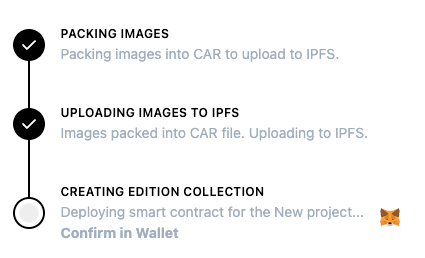
Review the transaction, then click "Confirm". After the transaction is confirmed, you'll see a modal with the next steps for your NFT collection.
Step 6: Share your NFT Collection with the World!
Congratulations! 🙌 Now that your NFT collection is live, it's time to spread the word and engage your community. Here's how you can promote and grow your collection:
- Share on Social Media
Promote your NFT collection on platforms like Twitter, Telegram, and Discord to attract collectors.
- Airdrop NFTs
Reward early supporters or influencers by airdropping NFTs to their wallets. This builds hype and loyalty.Learn about Airdrop.
- Create Gated Content for NFT Holders
It offers exclusive content and benefits for NFT holders, all of which you can manage through NFTs2Me. Access is restricted to holders only, making it a members-only experience.Learn about Token Gating.
- Activate On-Chain Affiliation
Encourage users to recommend your NFT collection by offering rewards for referring new collectors.Learn about Affiliates.
- Collaborate with Other Creators
Partner with other artists or projects to cross-promote and grow your audience.
- Monitor and Grow
Keep an eye on your project's progress and engage with your community through updates, new drops, or features to keep the excitement going.
By following these steps and actively promoting your collection, you'll start building a thriving community of NFT collectors.